# 🗺️ WorkAdventure Map Starter Kit

 
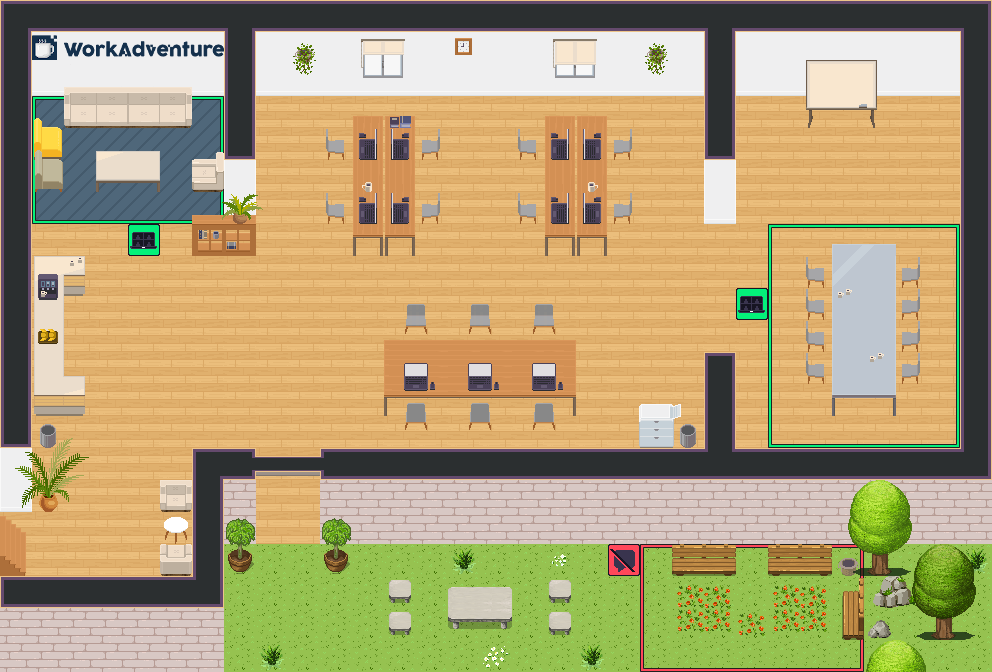
🗺️ This is a starter kit to help you build your own map for [WorkAdventure](https://workadventu.re).
📚 To understand how to use this starter kit, follow [our tutorial](https://docs.workadventu.re/map-building/tiled-editor/).
👨🏻🔧 If you have any questions, feel free to ask in the [WorkAdventure office](https://play.staging.workadventu.re/@/tcm/workadventure/wa-village).
## 🚀 Upload your map
In the `.env` file, you can set your upload strategy to `GH_PAGES` (default) or `MAP_STORAGE`. Simply comment out the option you don't want to use.
Uploading a map using [GitHub Pages](https://docs.github.com/pages) will host your project on GitHub servers, and it's the most straightforward way to add new maps to your world.
Uploading a map using the [WA map storage](https://docs.workadventu.re/map-building/tiled-editor/publish/wa-hosted) will host your project on WA servers. It's a bit more difficult to set up, but it comes with great advantages, like being able to have private repositories.
## 🗂️ Structure
We recommend following this file structure:
- *`public/`*: Static files like PDFs or audio files
- *`src/`*: Script files or design source files
- *`tilesets/`*: All PNG tilesets
> [!TIP]
> - If you want to use more than one map file, just add the new map file in the root folder (we recommend creating a copy of *office.tmj* and editing it to avoid any mistakes).
> - We recommend using **512x512** images for the map thumbnails.
> - If you are going to create custom websites to embed in the map, please reference the HTML files in the `input` option in *vite.config.js*.
## 📜 Requirements
- Node.js version >= 18
## Installation and testing
## 🛠️ Installation and Testing
With npm installed (which comes with [Node.js](https://nodejs.org/en/)), run the following command in the root directory of the project:
```bash
npm install
```
Then, you can test your map by running:
```bash
npm run dev
```
You can also test the optimized map as it will be in production by running:
```bash
npm run build
npm run prod
```
You can manually [upload your map to the WA Map Storage]([WA Map Storage](https://github.com/workadventure/upload-maps)) by running:
```bash
npm run upload
```
The three important variables that control the upload feature are:
1. `MAP_STORAGE_URL` *(local: created in .env by the upload command / CI: to be added as a Github secret optionally)*
2. `MAP_STORAGE_API_KEY` *(local: created in .env.secret by the upload command / CI: to be added as a Github secret)*
3. `UPLOAD_DIRECTORY` *(local: created in .env by the upload command / CI: to be added as a Github secret optionally)*
Read [the documentation](https://docs.workadventu.re/map-building/tiled-editor/publish/wa-hosted) to learn more about the upload feature.
## 📜 Licenses
This project contains multiple licenses as follows:
* [Code license](./LICENSE.code) *(all files except those for other licenses)*
* [Map license](./LICENSE.map) *(`office.tmj` and the map visual as well)*
* [Assets license](./LICENSE.assets) *(the files inside the `tilesets/` folder)*
> [!IMPORTANT]
> If you add third party assets in your map, do not forget to:
> 1. Credit the author and license of a tileset with the "tilesetCopyright" property by etiding the tileset in Tiled.
> 2. Add the tileset license text in *LICENSE.assets*.
> 3. Credit the author and license of a map with the "mapCopyright" property in the custom properties of the map.
> 4. Add the map license text in *LICENSE.map*.
## ❓ Need Help
If you have any questions or need further assistance, don't hesitate to ask either by [email](mailto:hello@workadventu.re) or [Discord](https://discord.gg/G6Xh9ZM9aR)!


🗺️ This is a starter kit to help you build your own map for [WorkAdventure](https://workadventu.re).
📚 To understand how to use this starter kit, follow [our tutorial](https://docs.workadventu.re/map-building/tiled-editor/).
👨🏻🔧 If you have any questions, feel free to ask in the [WorkAdventure office](https://play.staging.workadventu.re/@/tcm/workadventure/wa-village).
## 🚀 Upload your map
In the `.env` file, you can set your upload strategy to `GH_PAGES` (default) or `MAP_STORAGE`. Simply comment out the option you don't want to use.
Uploading a map using [GitHub Pages](https://docs.github.com/pages) will host your project on GitHub servers, and it's the most straightforward way to add new maps to your world.
Uploading a map using the [WA map storage](https://docs.workadventu.re/map-building/tiled-editor/publish/wa-hosted) will host your project on WA servers. It's a bit more difficult to set up, but it comes with great advantages, like being able to have private repositories.
## 🗂️ Structure
We recommend following this file structure:
- *`public/`*: Static files like PDFs or audio files
- *`src/`*: Script files or design source files
- *`tilesets/`*: All PNG tilesets
> [!TIP]
> - If you want to use more than one map file, just add the new map file in the root folder (we recommend creating a copy of *office.tmj* and editing it to avoid any mistakes).
> - We recommend using **512x512** images for the map thumbnails.
> - If you are going to create custom websites to embed in the map, please reference the HTML files in the `input` option in *vite.config.js*.
## 📜 Requirements
- Node.js version >= 18
## Installation and testing
## 🛠️ Installation and Testing
With npm installed (which comes with [Node.js](https://nodejs.org/en/)), run the following command in the root directory of the project:
```bash
npm install
```
Then, you can test your map by running:
```bash
npm run dev
```
You can also test the optimized map as it will be in production by running:
```bash
npm run build
npm run prod
```
You can manually [upload your map to the WA Map Storage]([WA Map Storage](https://github.com/workadventure/upload-maps)) by running:
```bash
npm run upload
```
The three important variables that control the upload feature are:
1. `MAP_STORAGE_URL` *(local: created in .env by the upload command / CI: to be added as a Github secret optionally)*
2. `MAP_STORAGE_API_KEY` *(local: created in .env.secret by the upload command / CI: to be added as a Github secret)*
3. `UPLOAD_DIRECTORY` *(local: created in .env by the upload command / CI: to be added as a Github secret optionally)*
Read [the documentation](https://docs.workadventu.re/map-building/tiled-editor/publish/wa-hosted) to learn more about the upload feature.
## 📜 Licenses
This project contains multiple licenses as follows:
* [Code license](./LICENSE.code) *(all files except those for other licenses)*
* [Map license](./LICENSE.map) *(`office.tmj` and the map visual as well)*
* [Assets license](./LICENSE.assets) *(the files inside the `tilesets/` folder)*
> [!IMPORTANT]
> If you add third party assets in your map, do not forget to:
> 1. Credit the author and license of a tileset with the "tilesetCopyright" property by etiding the tileset in Tiled.
> 2. Add the tileset license text in *LICENSE.assets*.
> 3. Credit the author and license of a map with the "mapCopyright" property in the custom properties of the map.
> 4. Add the map license text in *LICENSE.map*.
## ❓ Need Help
If you have any questions or need further assistance, don't hesitate to ask either by [email](mailto:hello@workadventu.re) or [Discord](https://discord.gg/G6Xh9ZM9aR)!